Shortcut
Let AI place your order
Using an AI browser assistant like Claude in Chrome? Copy the prompt below, paste it in, and it will walk through creating your Voler account and building the order for you — you’ll still confirm before anything submits or gets charged.
Paste this into your AI browser assistant.
You are helping me order my O'side Cycling kit from Voler (Custom Express program). Follow these steps in order. Ask me for any information you don't already have before you use it, and never submit an order or pay for anything without my explicit confirmation first.

1. Go to store.voler.com. Sign me in, or create a new account if I don't have one (ask me what email and password to use).
2. Open the Custom Express catalog. Under "Zippered Jerseys," select the Velocity Air jersey.
3. On "Choose a Design," pick the "Blank" template to open the 3D Design Studio.
4. In "Choose Your Design and Colors," set every panel — Base Color, Sleeves, Cuffs, Pocket, Side Panels, and Voler Logo Color — to the swatch named "20% Black."
5. In the Text tool, add "O'side" in the Deep Navy swatch in a bold italic script font, and add "C Y C L I N G" directly beneath it in the same navy in a letter-spaced sans-serif font. Place both on the left chest, stacked, O'side on top.
6. In the Graphics tool, upload the "never stop pedaling" rear-tagline image from this page (linked below) in navy script, and place it centered just below the rear collar on the back view.
7. Click Save Design, then Next Step. When asked for an email to save the design, use mine. Show me the saved Design ID and link before continuing — do not go further until I confirm it looks right.
8. Click "Order Now (Custom Express)." Set quantity to 1 and size to [ask me for my size if I haven't told you]. Continue through the review and shipping address pages using my shipping details [ask me for name, address, and phone if missing].
9. On the final order page, set Zipper Color to White. Paste this exact text into the Notes box (fill in my info first):
"O'side Cycling, [my name], [my email], [my phone]. 1) Jersey: one solid cool light gray overall, reference hex #D7D7D4; no panels, stripes, gradients or sponsor graphics; please match our club reference design as closely as possible. 2) Left chest logo, stacked: 'O'side' in bold italic script with 'CYCLING' in small letter-spaced sans caps directly beneath, minimal gap, centered under O'side; both Deep Navy #223D59; CYCLING in a heavier weight so it reads as dark as O'side; overall logo 2-2.25 in wide. 3) Rear: 'never stop pedaling' in the same navy script, small, centered just below the collar on the back. 4) Voler logo: remove if the program allows; otherwise tone-on-tone gray. 5) Size: [my size]; rider is [my height, weight, waist]. 6) Please send a proof before anything goes to production."
10. Before clicking Submit Order, stop and show me a summary: design/colors, size, shipping address, and the note text. Wait for me to say "confirmed" before you click Submit — this creates a quote, not a charge, so nothing is paid for yet.
11. After submitting, tell me the Quote ID and Workorder number, and remind me a proof is typically posted to my Voler workorder page within about a business day. Do not approve the proof or complete payment yourself — I'll review and do that myself once it's ready.
12. Separately, open the regular Voler store, go to Men's or Women's bottoms, and pull up "Super Bib — Navy" in my size [ask if missing] so I can review it — don't add to cart or check out without my confirmation.

Ask me for anything you're missing (account email/password, size, shipping address, phone) before you start, and pause for my explicit go-ahead before step 10's Submit Order and before any checkout or payment step.
Rear-tagline image for step 6: download never-stop-pedaling.png
This prompt is a guide for an AI browser assistant — it will still ask you to confirm your details and approve the final order and any payment. You’re always in control.
KIT ORDERING GUIDE
Order Your O’side Kit
This page walks you step by step through ordering your own O’side Cycling kit from Voler, using the exact process and settings the club has standardized on. Follow it exactly and your kit will match the club look.
What Voler Offers, and Which Program We Use
Voler (Grover Beach, CA, USA-made) sells custom cycling apparel two ways.
Full Custom
The team program: 15-piece minimum, 6–8 week production, a free team store where members order and pay individually, full product catalog, dedicated designer.
Custom Express
We use thisThe small-order program: no minimum, 7–10 business days after artwork approval and payment, limited garment list, you build the design yourself in Voler’s online 3D Design Studio, and a Voler artist cleans it up and sends a proof. Custom Express bottoms are black Pro Bibs only; custom bottoms in any other color require Full Custom with a 15-bottom commitment.
For now, O’side Cycling uses Custom Express for jerseys (one at a time, or up to 14) and buys bib shorts as plain stock garments from Voler’s regular store. When the club reaches 15 pieces we’ll move to Full Custom and a team store.
Voler contact: Custom Express artwork and proofing team, reachable through Voler’s ticket system at store@voler.com, or by phone at 800-644-4002, M–F 8:00–4:30 Pacific.
Don’t change these
The Fixed Kit Spec
- Jersey
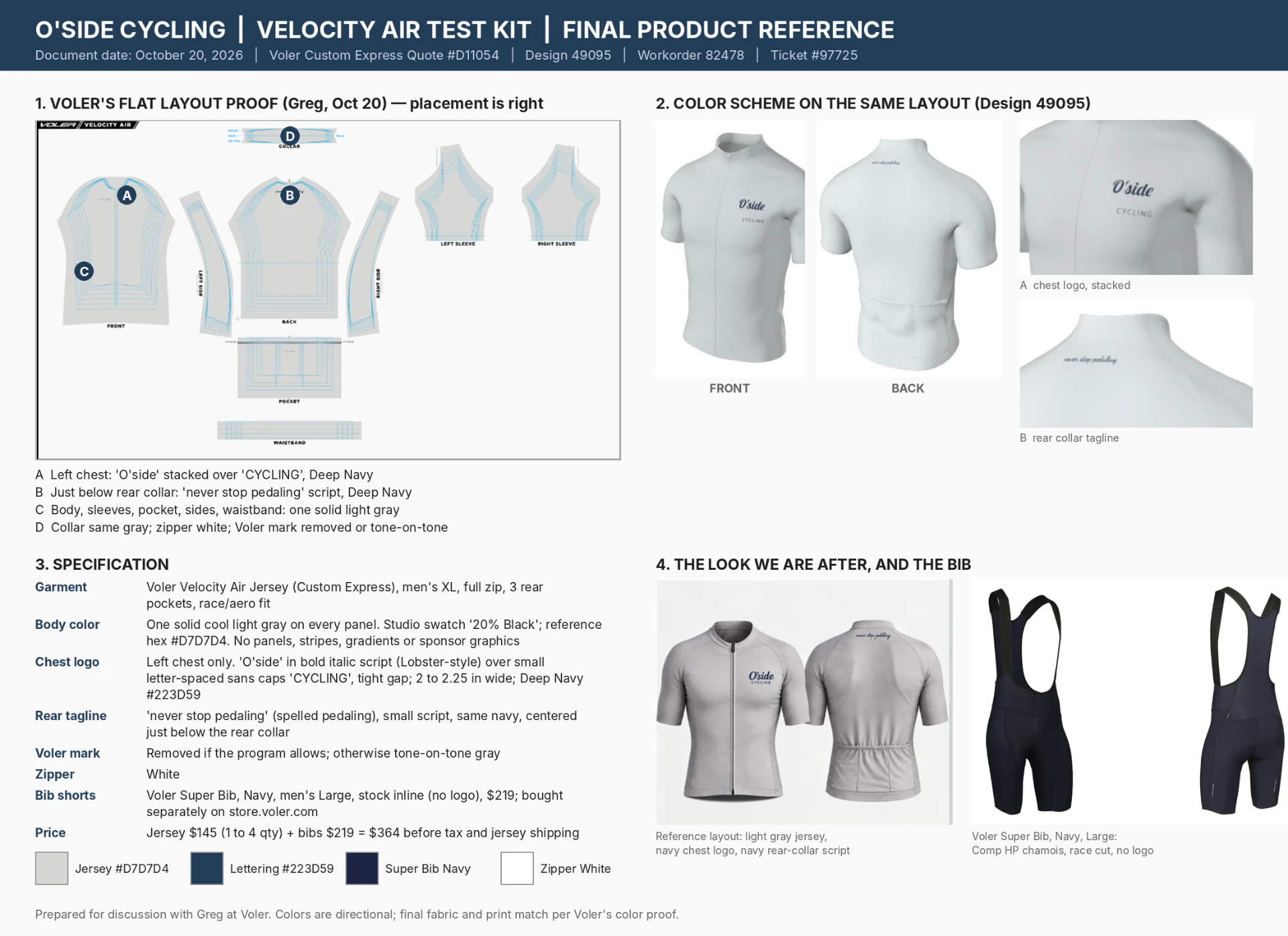
- Voler Velocity Air Jersey, Custom Express. Full zip, three rear pockets, race/aero fit. Approx. $145 at 1–4 pieces (2026 Voler pricing, subject to change). Reference/example size used for this kit: men’s XL — choose your own size using the sizing guide.
- Body color
- One solid cool light gray on every panel (body, sleeves, cuffs, pocket, side panels, collar, waistband). In the Design Studio this swatch is named “20% Black.” Reference hex #D7D7D4. No panels, stripes, gradients, or sponsor graphics.
- Chest logo
- Left chest only. “O’side” in bold italic script, stacked over “CYCLING” in small letter-spaced sans-serif caps directly beneath, tight gap. About 2–2.25 inches wide. Color: Voler swatch “Deep Navy,” hex #223D59.
- Rear tagline
- “never stop pedaling” in small navy script, centered just below the rear collar on the back.
- Voler mark
- Removed if Voler allows; otherwise set to match the body gray so it disappears.
- Zipper
- White.
- Bib shorts
- Voler Super Bib, Navy, stock item from the regular Voler store, no logo. Approx. $219 (2026 Voler pricing, subject to change; free shipping over $99). Chosen for the Comp HP chamois and compressive race cut. Navy anchors the light gray jersey and ties to the navy chest logo.Women’s equivalent: Voler W. Super Drop Tail Bib in Navy, same ~$219 (2026 Voler pricing, subject to change), also a stock item with no logo. Chosen for the integrated drop-seat design and the same compressive race fit.
- Estimated cost
- About $364 before tax and shipping ($145 jersey + $219 bibs); roughly $395–$410 all in. Estimate based on 2026 Voler pricing, subject to change.
Step by Step
- 0Create a Voler account at store.voler.com (email and password) before starting — the order form requires login to show the notes field and Submit button.
- 1Go to store.voler.com’s Custom Express catalog page. Under “Zippered Jerseys,” click SELECT on Velocity Air.
- 2On the “Choose a Design” page, pick the template named “Blank.” This opens Voler’s 3D Design Studio with a plain jersey.
- 3Colors: in the “Choose Your Design and Colors” tab, click the swatch named “20% Black” for every panel section — Base Color, Sleeves, Cuffs, Pocket, Side Panels, and Voler Logo Color. The jersey should now be solid light gray with no visible Voler mark.
- 4Text: click the “Text” tab, then “+”. Type “O’side,” choose the Deep Navy swatch, and pick a bold italic script font. Click “+” again, type “C Y C L I N G” (spaced letters) in the same navy with a sans-serif font. Drag each onto the left chest and stack CYCLING under O’side with a small gap. Precision doesn’t matter here — Voler’s artist repositions everything.
- 5Rear tagline: the Design Studio has no rear-text tool, so this goes on as a graphic. Use the “Graphics” tab, click “+”, upload a transparent PNG of “never stop pedaling” in navy script (download it here), then drag/rotate the 3D view to place it centered just below the rear collar.
- 6Save your design. Click “Save Design,” then “Next Step.” You’ll be asked for an email address to save — this creates a Design ID and emails you a link. Important: a saved design cannot be reopened for editing. Get it right before saving; if you need changes, rebuild from Blank and save a new ID.
- 7Order: on the Design Preview page, click “Order Now (Custom Express).” Find the Velocity Air block, enter your quantity and size, and click through Next on the review and address pages, logging in if prompted.
- 8Notes and submit: on the final page, set Zipper Color to White, paste the standard club art note into the Notes box, and click Submit Order. This creates a quote, not a charge — you’ll get a Quote ID and Workorder number by email, and a proof is typically posted to your workorder page within a business day.
- 9Review your proof on the workorder page. Custom Express proofs are flat pattern layouts in gray line art — they show placement, not color. Approve if placement matches spec; ask for a color proof first if you want to see color before approving. After approval, Voler emails a payment link — your card is only charged at that point. Production takes 7–10 business days after payment.
- 10Bib shorts (separate order): go to the regular Voler store, Men’s or Women’s bottoms, “Super Bib — Navy.” Pick your size (runs compressive — size up if between sizes), add to cart, and check out like a normal retail purchase. Ships in about a business day. No club logo on these.

Copy and paste into the order Notes box
Standard Art Note
Replace the [bracketed] items with your own details.
O'side Cycling, [your name], [your email], [your phone]. 1) Jersey: one solid cool light gray overall, reference hex #D7D7D4; no panels, stripes, gradients or sponsor graphics; please match our club reference design as closely as possible. 2) Left chest logo, stacked: 'O'side' in bold italic script with 'CYCLING' in small letter-spaced sans caps directly beneath, minimal gap, centered under O'side; both Deep Navy #223D59; CYCLING in a heavier weight so it reads as dark as O'side; overall logo 2-2.25 in wide. 3) Rear: 'never stop pedaling' in the same navy script, small, centered just below the collar on the back. 4) Voler logo: remove if the program allows; otherwise tone-on-tone gray. 5) Size: [size]; rider is [height, weight, waist]; please confirm fit before production. 6) Please send a proof before anything goes to production.
Sizing Guidance
Velocity Air Jersey
Voler men’s chart reference: Large is chest 40–42 in, waist 34–36 in, 170–190 lb; XL is chest 42–44 in. The Velocity Air is an aero race cut — size by chest measurement, and riders near the top of a size band or wanting a race fit without restriction should size up one.
Super Bib
Stay true to your waist and weight; don’t size up unless you’re between sizes — compression is the point.
Things to Watch Out For
Before you start
- Skip Voler’s general contact forms — go straight to the Custom Express catalog link, or you may end up in a Full Custom (15-piece) conversation instead.
- The Design Studio does not save until the email step, and it reloads to a blank/black jersey if you navigate away mid-session.
- Saved designs are frozen and cannot be edited — double check everything before you save.
- When ordering stock bib shorts, double check your cart before checkout — the wrong size can get added if the page scrolls while you click.
- Popular sizes/colors on stock items can run low — order bibs around the same time as your jersey.
Links
Voler Custom Express catalog
Start your jersey here — Zippered Jerseys → Velocity Air.
store.voler.comSuper Bib — Navy
Stock item from the regular store. Choose Navy and your size.
Women’s Super Drop Tail Bib — Navy
Women’s equivalent stock item from the regular store. Choose Navy and your size.
Questions about the design or sizing? Reach out to dave@wrfco.com and we’ll help you through it.